
Language
Views: 222 Author: Edvo Publish Time: 2025-12-09 Origin: Site


Content Menu
● Understanding Thermacell Red Blinking Light
● How Thermacell Heated Insoles Work
● Main Meanings of Red Blinking Light
● Red Blinking Light Right After Power On
● Red Blinking Light During Heating
● Red Blinking Light While Charging
● Low Battery and Error‑Type Blink Patterns
● Step‑by‑Step Troubleshooting Guide
● Safety Tips When Red Light Looks Wrong
● Everyday Usage Tips for Longer Life
● Why an OEM Heated Insole Partner Matters
● OEM Customization Options for Heated Insoles
● Partnering With a China‑Based Heated Insole Factory
● FAQ
>> 1. What does a slow red blink mean on Thermacell heated insoles?
>> 2. How can I tell which heat level is active?
>> 3. Why does the light still blink when my insoles are on the charger?
>> 4. What should I do if the red light flashes rapidly or looks abnormal?
>> 5. Can a red blinking light indicate a safety problem?
The red blinking light on Thermacell heated insoles generally indicates the current working status of the insole system, such as standby, active heating, or a special state like pairing or charging‑related issues. By learning the different blink patterns, users can quickly judge whether the insoles are functioning normally, need recharging, or require troubleshooting.
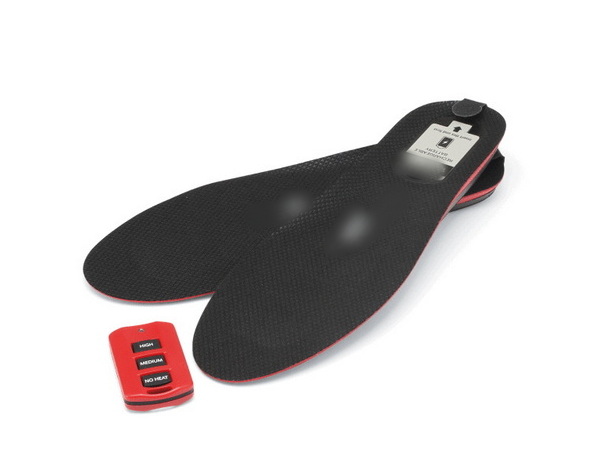
When the insoles are switched on at the heel, a red indicator near the heel typically begins to blink and the insoles start in a low‑power standby state. This means the power system is active, but heat output has not yet been enabled until a temperature setting is selected with the controller.
The blink pattern then changes according to the warmth level. A simple pattern often represents standby, a slightly more frequent pattern indicates medium warmth, and a more intense pattern signals a higher warmth level. These patterns help users confirm the selected mode even when the insoles are already inside boots or other closed footwear.
Thermacell heated insoles combine an internal rechargeable power pack with thin heating elements built into the insole structure. The power pack is usually a lithium‑ion polymer battery sealed inside the insole, and users recharge it using dedicated charger units that connect at the heel or through removable battery modules.
The warmth is controlled by a separate remote or control unit that sends wireless commands to the insoles. Once the control unit is paired with the insoles, the user can select different warmth levels, and each level is reflected not only in the warmth felt under the foot but also in the way the red indicator blinks.
The red indicator can represent several different states of operation, so the meaning depends heavily on blinking speed and pattern. In general use, it can indicate standby mode, active heating at a moderate or higher level, pairing steps, or charging and battery‑related states.
Users should always refer to the official guide for the specific product model, because not every generation of heated insoles uses exactly the same pattern design. However, the concept remains consistent: slow and calm patterns usually mean normal status, while unusually rapid or irregular patterns often suggest that attention or troubleshooting is needed.
Right after switching the insoles on, the red indicator normally begins to blink automatically, even though the user may not feel warmth at once. This indicates that the insole electronics have finished their internal checks and are ready to receive commands from the control unit.
During this initial state, the insoles typically remain in a no‑heat standby mode, drawing only minimal current from the battery pack. Once the user selects a warmth level on the controller, the internal circuit responds by adjusting heat output and modifying the blink rhythm so that it reflects the new mode.
While the insoles are actively warming the feet, the red indicator continues to blink in a pattern that matches the selected warmth level. As the level increases, the blink pattern also tends to become more distinct or more frequent, signaling that the heating elements are drawing more energy from the battery.
Rather than staying constantly lit, the indicator uses repeating blink cycles to provide feedback while still conserving energy. That design allows users to quickly check status by briefly lifting the heel or looking into the boot opening without needing a continuous, power‑hungry light.
When the insoles are connected to their dedicated charger, the primary charging status is usually reported on the charger body rather than only at the heel indicator. A clear, stable signal on the charger shows that power flows properly and that the pack is actively charging, while a change to a different stable signal means the pack has reached full capacity.
Toward the end of the charging process, some charger designs shift between two visible states, which can look like flickering or alternating phases. This behavior indicates a transition from active charging to a maintenance stage, in which the charger manages the battery very carefully to avoid overcharging while keeping it ready for use.
In some heated insole systems, including a variety of heated gear products, a very fast or unusually persistent red blinking pattern can signal a low battery. When the power level drops too far, the product may automatically reduce the warmth setting or shut down to protect the battery pack from deep discharge.
If the indicator shows strange blinking while the insoles are attached to the charger, this can point to connection issues such as a loose plug, a damaged port, or use of a charger that does not meet the intended specifications. In this situation, the recommended action is to disconnect everything, inspect the connectors, and avoid further attempts until the problem is clearly identified.
When the red blinking light does not look normal, users can follow a simple sequence of checks before assuming the product is faulty.
First, fully power the insoles off, wait for a short period, and then power them on again to reset the internal electronics. Next, give the insoles a complete recharge cycle, allowing the charger to run until its indicator clearly shows the end of the process, rather than disconnecting too early.
After charging, confirm that the remote or controller has a healthy power source and has been paired correctly with the insoles. Try switching through each warmth setting one by one, watching how the red indicator responds, and note whether the warmth output under the foot matches the blinking pattern.
If the control unit still appears unresponsive, follow the official pairing or reset procedure for that model, which often involves a combination of button presses until the indicator enters a special flashing mode. After pairing, test again with the insoles outside of shoes so that both the heel indicator and the actual heating areas are clearly visible.
When the insoles have been stored unused for a long time, it can help to allow a gentle discharge during a short wearing period and then perform a full recharge. This approach supports more stable behavior for lithium‑ion polymer batteries and can sometimes restore performance if capacity seemed temporarily reduced.
If the red blinking remains abnormal or the insoles fail to respond even after these steps, users should stop using the system, disconnect the charger, and contact product support or an authorized service provider.
Any heated product that uses an internal lithium‑ion or lithium‑polymer battery needs to be handled carefully when something does not look right. If the red indicator coincides with visible damage, unusual odor, excessive surface temperature, or swelling of the insole body, the insole should not be worn or charged again.
Users should only connect the insoles to chargers and power sources that are designed for the same system, following the manufacturer's stated requirements for voltage and current. When discarding old heated insoles, it is important to use local electronic waste or battery collection services rather than throwing them into regular household rubbish.
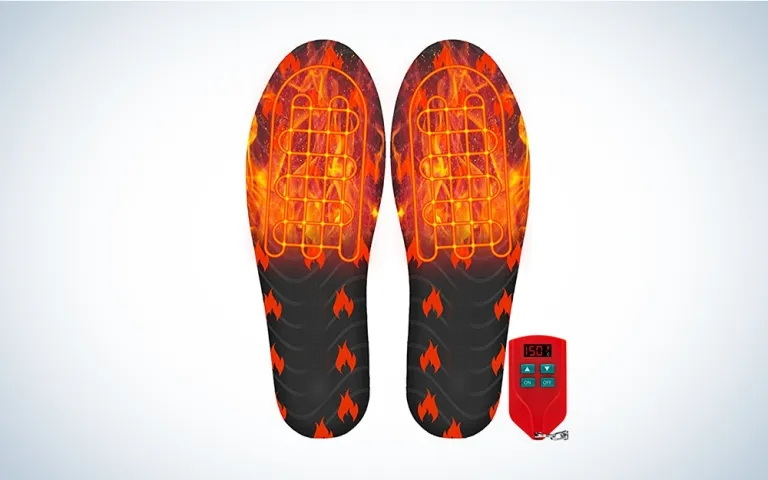
To keep heated insoles running smoothly and extend their service life, a few simple habits make a big difference. After returning from outdoor use, allow the insoles to cool and dry naturally at room temperature instead of placing them directly near intense heat sources.
Avoid bending or folding the insoles sharply, as this can stress internal wiring and heating elements embedded in the structure. During seasons with little or no use, store the insoles in a cool and dry place, with the batteries partially charged instead of completely drained or left on the charger for extremely long periods.
When cleaning, gently wipe the surface with a soft, slightly damp cloth and avoid soaking the insoles in water or strong cleaning chemicals. Careful handling not only protects the outer materials but also helps preserve the integrity of the internal electronics that drive the red indicator and heat system.
Behind every reliable heated insole product is a manufacturing partner that understands both thermal engineering and large‑scale production for international markets. A dedicated heated insole factory designs the internal power layout, heating circuits, safety systems, and indicator logic so that end users receive stable warmth and clear feedback from devices such as the red blinking light.
For overseas brands, wholesalers, and footwear producers, working with an experienced original equipment manufacturer makes it possible to balance comfort, safety, and design freedom. Such a partner can tailor the way indicators behave, optimize battery capacity, and adjust heat output curves so that the final product perfectly fits specific outdoor, workwear, and winter sports niches.
An established heated insole factory can provide a wide range of original equipment customization options for global customers in the footwear and outdoor gear sectors.
- Custom insole outlines and cushioning designs to match casual shoes, work boots, ski boots, hunting footwear, and specialized safety footwear.
- Flexible heating layouts that concentrate warmth under the toes, across the forefoot, or over larger regions according to the target environment.
- Internal power solutions with different battery capacities and control logic, allowing brands to choose between longer runtime or more intense warmth levels.
- User interface designs that include handheld remotes, in‑boot switches, or app‑based control, each with its own indicator color and blink scheme matching the brand identity.
- Branding elements such as tailored surface textures, logos, label designs, and packaging suited for retail shelves, online sales, or bulk wholesale supply.
- Quality systems that cover electrical safety tests, temperature stability tests, flexing and durability tests, so each batch of insoles delivers consistent performance in demanding conditions.
By integrating research, development, production, and quality management under one roof, the factory can shorten project timelines and reduce overall costs for large orders.
A China‑based heated insole specialist with strong export experience understands the certification, documentation, and logistics needs of foreign brands. Support can include assistance with compliance in major markets, provision of test reports, and packaging documentation to satisfy distributors and retail chains.
For brands and wholesalers interested in expanding cold‑weather footwear or outdoor product lines, a dedicated partner can supply a full portfolio of heated insole products under private label programs. Combining advanced thermal solutions with efficient production capacity allows this partner to deliver stable quality and competitive cost for both seasonal and year‑round demand.
The red blinking light on Thermacell heated insoles serves as a clear status indicator, showing whether the system is in standby mode, delivering warmth at a moderate or higher level, performing pairing operations, or signaling charging and battery states that may need attention. Understanding these blink patterns, following a straightforward troubleshooting routine, and observing proper safety and care practices helps users get reliable warmth and long product life from their heated insoles. For overseas brands and wholesalers planning to launch or enhance heated insole ranges, cooperation with an experienced Chinese original equipment manufacturer offers the opportunity to create customized, high‑performance products that satisfy both comfort expectations and commercial objectives.
A slow, repeating red blink usually indicates that the insoles are switched on but in a standby or no‑heat state. In this mode, the electronics are ready for control commands, while battery consumption remains very low.
Each warmth level is linked to its own red indicator pattern, with gradually stronger patterns for higher settings. By watching the rhythm of the blinking while pressing the control buttons, users can confirm that the desired mode is active without removing their footwear.
If the insoles were left switched on when connected to power, the heel indicator can continue to blink even though charging is handled mainly by the charger unit. The main charging status should always be checked on the charger itself, which shows when charging starts and when it is completed.
Unusually rapid or irregular blinking often indicates pairing issues, low battery, or other faults that need attention. The best response is to switch everything off, complete a full recharge, repeat pairing procedures if necessary, and stop using the insoles while seeking support if the strange behavior continues.
Most of the time the red indicator simply shows operating status, but if it appears together with visible damage, deformation, strange smell, or excessive heat, that can signal a potential safety risk. In that situation, the insoles should be removed from footwear, disconnected from chargers, kept away from flammable materials, and handled according to local battery and electronic waste guidelines.


