
Language
Views: 222 Author: Edvo Publish Time: 2025-11-30 Origin: Site


Content Menu
● Main Types Of Heated Insoles
● Preparation Before Turning On
● How To Turn On Button‑Control Heated Insoles
● How To Turn On Remote‑Control Heated Insoles
● How To Turn On App‑Controlled Heated Insoles
● How To Turn On Disposable Heated Insoles
● Checking Power And Heat Status
● Adjusting Heat Levels Safely
● Typical Runtime After Turning On
● Safety Tips When Turning On Heated Insoles
● How To Turn Off And Store After Use
● Maintenance And Care For Long‑Term Use
● Practical Usage Scenarios And Tips
● Using Photos And Videos In A Heated Insole Guide
● FAQs About Turning On Heated Insoles
>> 1. Why won't my heated insoles turn on?
>> 2. How do I know my heated insoles are actually on?
>> 3. Can I turn on heated insoles before putting them in my shoes?
>> 4. Is it safe to keep heated insoles on at the highest setting all day?
>> 5. Do I need to turn off heated insoles before charging them?
Heated insoles bring controllable warmth to the bottom of the feet by combining thin heating elements with compact power systems. They are widely used in winter sports, outdoor work, commuting, and any situation where cold feet cause discomfort or even health risks. Understanding how to turn them on correctly helps users enjoy consistent warmth, extend product life, and stay safe.
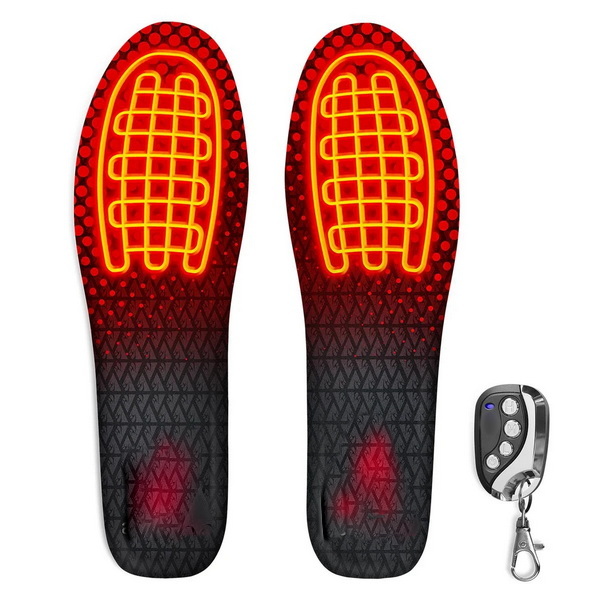
Heated insoles are removable footbeds that sit inside shoes or boots and gently warm the underside of the feet. They typically use flexible heating wires or panels embedded in foam or other cushioning materials, powered by rechargeable or disposable power sources. When activated, the heat spreads through the forefoot and toe area, which are usually the coldest parts of the foot in low temperatures.
Many modern heated insoles include multiple heat settings, indicator lights, and sometimes remote or app control. This allows users to balance comfort, safety, and battery runtime according to the conditions and their own sensitivity. Designs vary, but most aim to remain thin, lightweight, and compatible with everyday footwear.
Different insole designs influence how users turn them on and off, and how they adjust heat. Before operating any pair, it is important to identify the type:
- Built‑in battery insoles with a small control button near the heel or arch.
- Insoles powered by cabled external battery packs mounted on the ankle or calf.
- Remote‑control models that combine insole buttons with a handheld key‑style remote.
- Smart app‑controlled insoles that pair with a mobile phone for heat adjustment.
- Disposable chemical heat insoles that activate when exposed to air.
Each type has its own activation sequence, but the general principles remain the same: charge or activate the power source, place the insole correctly, then use the designated control to turn on and adjust the heat.
Preparation is the foundation of safe and effective use. Before powering on any heated insole:
- Fully charge rechargeable batteries according to the manufacturer's time recommendations.
- Check the surface for visible damage, deep cuts, excessive creasing, or swelling near the battery housing.
- Confirm that connectors and charging ports are clean and dry.
Next, ensure the insoles match the shoe size. If the design allows trimming, cut only along marked lines and never into the heating zone or near wiring. After trimming, test the fit inside the shoes: the insole should lie flat without buckling, and the heel should nest comfortably in the heel cup.
For many rechargeable models, a small button on the heel edge, side, or battery pouch switches the insole on. A typical sequence looks like this:
1. Insert the fully charged insoles into the shoes, with the heating area aligned under the toes and ball of the foot.
2. Once the shoes are on, locate the power button by touch at the heel or side.
3. Press and hold the button for a few seconds until an indicator light appears or changes state.
4. Release the button when the light shows a steady or clearly “on” signal.
After the initial activation, short presses usually cycle through low, medium, and high heat modes, often shown by different light patterns or colors. To switch off, press and hold the same button until the indicator goes dark. It is good practice to turn off both insoles before removing shoes at the end of the day.
Remote‑control insoles are popular because they allow users to operate the heating system without bending down or removing footwear. Turning them on typically involves two stages:
- First, power up each insole with its physical button or switch so the electronics become ready to receive remote commands.
- Second, use the remote to activate heating, raise or lower the level, and turn the insoles off when warmth is no longer needed.
Some sets require an initial pairing process between the insoles and the remote. This often means putting the insole in a pairing mode (for example, a flashing light pattern) and then pressing a button on the remote until the light becomes steady. Once paired, the remote usually operates both insoles simultaneously or offers separate left and right channels.
App‑controlled heated insoles provide advanced functionality such as precise temperature levels, timers, and separate control for left and right feet. A typical activation procedure includes:
- Turn each insole on with its hardware button so the Bluetooth module becomes active.
- Open the dedicated mobile app on a smartphone and enable wireless connectivity.
- Scan for nearby devices and select the correct insole model from the list.
After connection, the app interface usually presents options to switch heating on or off, choose temperature levels, and sometimes define custom profiles such as “commute”, “hiking”, or “workday”. Many apps show live battery status, allowing users to decide whether to run high power briefly or select a moderate level for longer periods.
Disposable heated insoles do not use batteries or electronics. Instead, they rely on a chemical mixture that produces heat once exposed to air. Turning them “on” is straightforward:
- Open the sealed package just before use so air can contact the heating compound.
- Gently shake the insoles to distribute the contents evenly.
- Place them inside the shoes as directed, often with a marked side facing upward toward the foot.
These insoles gradually warm up over several minutes and then maintain heat for a limited duration. They cannot truly be turned off, but removing them from shoes or placing them in a low‑oxygen environment can slightly slow the heating reaction.

Once insoles have been turned on, it is important to confirm they are working as expected. Users can check:
- Indicator lights on each insole or external battery pack, which may show power and mode.
- Remote or app icons that confirm whether heating is active and which level is selected.
After activation, warmth usually becomes noticeable in a short time, but very thick socks, tight boots, or extremely cold environments can delay the sensation. If the indicator shows “on” but no warmth is felt after a reasonable period, check that the battery is charged and correctly connected, and ensure socks and shoes are not compressing the heating area too tightly.
The ability to adjust heat makes electronic insoles versatile, but it also requires careful use. Safe adjustment habits include:
- Begin with the lowest level, especially on first use or with new footwear, and only increase if feet still feel cold.
- Avoid staying on maximum power for very long periods, particularly in insulated boots where heat can accumulate.
- If feet feel uncomfortably hot, prickly, numb, or irritated, immediately reduce the level or turn the insoles off.
For activities involving changing intensity, such as walking up hills, riding, or alternating between indoor and outdoor spaces, it is sensible to anticipate temperature shifts. Lower the setting just before entering a warm building or starting intense activity, then increase again only if needed.
Battery runtime depends heavily on the selected heat level, battery capacity, and ambient conditions. In general:
- Lower heat levels provide the longest operating time and are often sufficient when combined with good socks and insulated footwear.
- Medium levels offer a balance of comfort and runtime for most everyday use.
- Highest levels deliver intense warmth but drain batteries quickly and are best reserved for short bursts in harsh cold.
Users planning long days outdoors can extend runtime by turning insoles off during breaks in heated areas, lowering levels while walking or exercising, and ensuring batteries are fully charged before leaving home. Some power packs support top‑ups via portable power banks during rest stops.
Turning on heated insoles is not only about comfort; there are safety aspects to consider:
- Do not use insoles that show cracks, severe deformation, broken wiring, or swollen battery housings.
- Avoid using heated insoles in very wet conditions, in standing water, or during activities where shoes may be completely soaked.
- People with reduced sensation in their feet, poor circulation, or certain medical conditions should consult a health professional before using foot heating products.
If any burning smell, smoke, or unusual noise comes from the insole or battery area, turn the system off immediately, remove the shoes in a safe place, and stop using the product. Children, older adults, and people who cannot easily sense or communicate discomfort should be supervised and kept on lower settings.
Shutting down and storing heated insoles correctly is as important as turning them on:
- At the end of use, switch off heating using the insole button, remote, or app. For safety, also power down any external battery pack if it has its own switch.
- Remove insoles from shoes and allow them to cool and air out at room temperature.
- Wipe away surface dirt with a soft, slightly damp cloth and avoid getting electronic parts wet.
Once dry, store insoles and batteries in a cool, dry place away from direct heat sources. For rechargeable models, a partial recharge every few months helps maintain battery health even when the product is not in active use. Disposable versions should be allowed to fully cool before being placed in household waste according to local rules.
Good maintenance keeps heated insoles comfortable and reliable across many seasons. Useful care habits include:
- Regularly inspect stitching, foam, and cables for wear, as damaged components can reduce comfort or compromise safety.
- Clean insoles gently, avoiding harsh chemicals or soaking, which may damage adhesives or protective coatings around wiring.
- Allow both shoes and insoles to dry thoroughly after use so moisture does not accumulate and cause odors or deterioration.
When insoles become heavily worn, flattened, or fail to heat evenly even with a full charge, replacement is usually more economical and safer than continuing use. Brands that provide spare battery packs, replacement remotes, and detailed care instructions can be especially appealing for frequent users.
Different environments require different approaches when turning on heated insoles:
- For daily commuting, many people switch insoles to a low or medium setting just before leaving home, then turn them off after arriving at the office.
- Outdoor workers may keep insoles on a low background level for most of the shift and briefly raise the heat during breaks or static tasks.
- Winter sports enthusiasts frequently pre‑warm boots indoors at a low setting, then increase heat on cold lifts or while waiting at the bottom of slopes.
Carrying a compatible charging cable or spare battery pack is helpful on long trips, particularly in mountain, hunting, or fishing environments where extended exposure to cold is expected. Combining heated insoles with moisture‑wicking socks and quality footwear maximizes overall effectiveness.
For brands, retailers, and factories that produce heated insoles, educational content with photos and videos can significantly improve user experience. A complete guide might include:
- Close‑up step sequences: charging, inserting the insole, pressing and holding the power button, and adjusting levels.
- Demonstrations of remote and app control: pairing steps, indicator behavior, and typical adjustments in real‑life scenarios.
- Safety demonstrations: examples of correct and incorrect fit, safe charging setups, and what damage looks like so users know when to stop using a product.
Showing different use scenes, such as commuting, hiking, skiing, cycling, and warehouse work, helps viewers understand how and when to turn insoles on, when to change levels, and when to switch them off. For an OEM manufacturer, combining these visuals with clear branding and multilingual subtitles can also support overseas partners in training their customers.
Turning on heated insoles the right way begins with proper preparation: fully charging or activating the power source, checking the product's condition, and ensuring a correct fit in the shoe. Once ready, the correct method—button, remote, app, or air activation—makes it easy to start and control warmth for the specific environment and activity. By adjusting heat gradually, monitoring comfort, observing safety guidance, and following simple care routines, users can enjoy warm, protected feet while extending the life and reliability of their heated insoles.
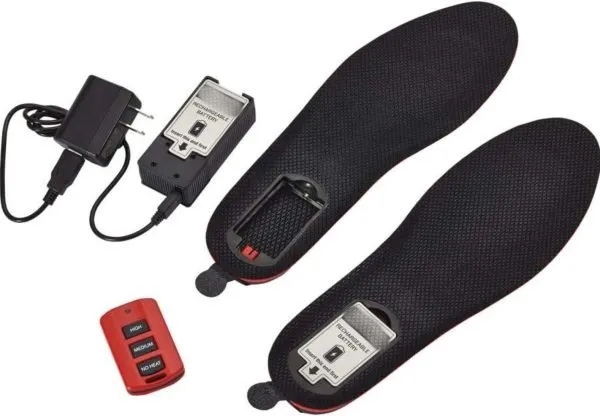
Common reasons include insufficient charging time, loose connections between the insole and external battery pack, or not pressing the power button long enough. Make sure the product has been charged as instructed and that all cables or connectors are firmly seated. If there is still no light or heat, discontinue use and consult the seller or manufacturer.
Most electronic models show a clear visual signal when heating is active, such as a steady indicator near the heel or on the battery pack. After a short period, you should feel gentle warmth under the ball of the foot and toes. If there is a light but no heat, check the battery level, shoe fit, and any temperature setting controls on the remote or app.
It is usually possible to activate them briefly before putting shoes on to pre‑warm the insole surface, as long as they rest on a stable, dry surface. However, many manufacturers prefer that users place insoles in the shoes first and then power them on so the heating area aligns correctly with the foot and is not accidentally covered or bent.
Using the highest setting continuously is not recommended because it can shorten battery life and increase the risk of discomfort or hot spots. For long days, a better strategy is to rely on medium or low heat for background warmth and reserve the highest setting for short periods in extreme cold. Anyone with sensitive skin or circulation issues should be especially cautious.
Yes, rechargeable insoles should always be switched off before connecting them to a charger. Turning them off prevents unintended heating during charging, reduces stress on the battery, and aligns with normal safety practices for heated footwear. Allow insoles to cool at room temperature before charging if they were used on a high setting.


